Offloading ClickHouse Disk I/O to an SD Card on Raspberry Pi 4B
Created:
Introduction
For network monitoring, I run a Raspberry Pi 4B as test access point (TAP). Plus some other hardware like the Throwing Star LAN Tap from Great Scott Gadgets and Belkin B2B048 USB ethernet adapter. To visualize the network traffic and analyze it, I use ntopng. ClickHouse is the backend database for ntopng that saves the collected network data.
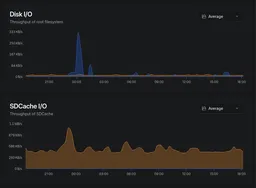
The main drive of the Raspberry Pi 4B is a 128GB USB stick, which is fast and reliable for the OS and applications. However, ClickHouse generates a lot of disk I/O on the main drive, which can lead to performance issues and wear over time. To mitigate this, I decided to use an extra SD card as a secondary data drive for ClickHouse's data directory. This allows me to offload the I/O from the main drive and extend the lifespan of the USB stick.
If you already have and SSD or NVMe drive connected to your Raspberry Pi, this is unnecessary, as those drives are much faster and more durable than USB-Sticks or SD cards. However, for budget-conscious setups or when using older Raspberry Pi models without NVMe support, this SD card offloading method can be a practical solution to improve performance and extend the lifespan of your main drive.
Step-by-Step: Format the SD Card and Symlink ClickHouse’s Data Directory
1. Identify the SD Card
Run lsblk to list your storage devices:
lsblkIt should look something like this (if you inserted an already used SD card):
[1:0:1623][root@rhea:pts/0][~]
# lsblk
NAME        MAJ:MIN RM   SIZE RO TYPE MOUNTPOINTS
loop0         7:0    0     2G  0 loop
sda           8:0    0 119.6G  0 disk
├─sda1        8:1    0   512M  0 part /boot/firmware
└─sda2        8:2    0 119.1G  0 part /
mmcblk0     179:0    0  29.7G  0 disk
└─mmcblk0p1 179:1    0  29.7G  0 part
zram0       254:0    0     2G  0 disk [SWAP]
Look for mmcblk0 (your SD card). It will usually have partitions like mmcblk0p1 and mmcblk0p2.
2. Format the SD Card as a Data Drive
Unmount Partitions
sudo umount /dev/mmcblk0*Delete All Partitions
Use fdisk to clean up the SD card:
sudo fdisk /dev/mmcblk0- Press
dto delete each partition (e.g.,d, then1, then2). - Press
nto create a new partition, thenwto save changes.
Format the Entire SD Card
For Linux (ext4):
sudo mkfs.ext4 /dev/mmcblk0Create a Mount Point
sudo mkdir -p /mnt/sdcardMount the SD Card
sudo mount /dev/mmcblk0 /mnt/sdcardSet Permissions
sudo chown -R $USER:$USER /mnt/sdcardAuto-Mount on Boot (Optional)
Edit /etc/fstab:
sudo nano /etc/fstabAdd this line (adjust for your filesystem):
/dev/mmcblk0 /mnt/sdcard ext4 defaults,nofail,noatime 0 2Verify the Mount
df -h
ls /mnt/sdcard
It should look like this:
[1:0:1643][root@rhea:pts/0][~]
# df -h
Filesystem      Size  Used Avail Use% Mounted on
udev            1.6G     0  1.6G   0% /dev
tmpfs           760M   25M  735M   4% /run
/dev/sda2       118G  8.9G  104G   8% /
tmpfs           1.9G     0  1.9G   0% /dev/shm
tmpfs           5.0M   12K  5.0M   1% /run/lock
tmpfs           1.0M     0  1.0M   0% /run/credentials/systemd-journald.service
tmpfs           1.9G     0  1.9G   0% /tmp
/dev/mmcblk0     30G    1M   30G   1% /mnt/sdcard
/dev/sda1       510M   66M  445M  13% /boot/firmware
tmpfs           1.0M     0  1.0M   0% /run/credentials/systemd-networkd.service
tmpfs           380M  8.0K  380M   1% /run/user/0
tmpfs           1.0M     0  1.0M   0% /run/credentials/getty@tty1.service
tmpfs           1.0M     0  1.0M   0% /run/credentials/serial-getty@ttyS0.service
overlay         118G  8.9G  104G   8% /var/lib/docker/overlay2/7e94d42422b5a688377c362d9ef9b61179691af381d54ff7a447d2a913696e44/merged
overlay         118G  8.9G  104G   8% /var/lib/docker/overlay2/a02588fc3931d5d98a00d1aa12ec4c7cc2db26663b9f919b27a64d58380fa6f1/merged
overlay         118G  8.9G  104G   8% /var/lib/docker/overlay2/470b1baede9914431b5026947686ceb0313086e5e7ef0fad8a9cef5bc308a611/merged

[1:0:1684][root@rhea:pts/0][~]
# ls /mnt/sdcard/
lost+found
3. Symlink /var/lib/clickhouse/ to the SD Card
Stop ClickHouse
sudo systemctl stop clickhouse-serverCreate the Target Directory on the SD Card
sudo mkdir -p /mnt/sdcard/clickhouse/var/libMove Existing Data
Warning: Complete this step before removing the original directory. Skipping it will permanently delete your ClickHouse data.
sudo rsync -av /var/lib/clickhouse/ /mnt/sdcard/clickhouse/var/lib/Remove the Original Directory
sudo rm -rf /var/lib/clickhouseCreate the Symlink
sudo ln -s /mnt/sdcard/clickhouse/var/lib /var/lib/clickhouseSet Permissions
sudo chown -R clickhouse:clickhouse /mnt/sdcard/clickhouse/var/lib
sudo chown -R clickhouse:clickhouse /var/lib/clickhouse
Restart ClickHouse
sudo systemctl start clickhouse-serverVerify the Symlink
ls -l /var/lib/clickhouseExpected output:
lrwxrwxrwx 1 root root 28 Mar 23 12:34 /var/lib/clickhouse -> /mnt/sdcard/clickhouse/var/libSummary
By adding an extra SD card as a secondary data drive, you:
- Offload disk I/O from the main USB stick, improving performance and longevity.
- Expand storage without replacing the main USB stick.
- Save costs by using affordable or already available SD cards.
This setup is ideal for Raspberry Pi 4B projects (e.g., home automation, media centers, or lightweight databases) where disk I/O can wear out the main drive over time. Just remember to monitor the SD card's health and performance, as they can degrade faster than traditional hard drives under heavy I/O workloads.
If you have already an NVMe drive connected to your Raspberry Pi, this is unnecessary, as NVMe drives are much faster and more durable than USB-Sticks or SD cards. However, for budget-conscious setups or when using older Raspberry Pi models without NVMe support, this SD card offloading method can be a practical solution to improve performance and extend the lifespan of your main drive.
Troubleshooting
ClickHouse Fails to Start After Reboot
The nofail option in /etc/fstab prevents a boot failure if the SD card is missing, but ClickHouse will silently fail without its data directory. To ensure the SD card is mounted before ClickHouse starts, add a RequiresMountsFor directive to the service unit:
sudo systemctl edit clickhouse-serverAdd the following and save:
[Unit]
RequiresMountsFor=/mnt/sdcard
Then reload systemd and restart ClickHouse:
sudo systemctl daemon-reload
sudo systemctl restart clickhouse-server
Permission Errors
If ClickHouse fails to start with permission errors after the symlink, verify and fix ownership:
ls -la /mnt/sdcard/clickhouse
sudo chown -R clickhouse:clickhouse /mnt/sdcard/clickhouse
Monitoring SD Card Health
SD cards degrade faster than traditional drives under heavy write workloads. Check for I/O errors periodically:
sudo dmesg | grep -i mmcblkTo scan for bad blocks (read-only, non-destructive; unmount the card first):
sudo umount /mnt/sdcard
sudo badblocks -v /dev/mmcblk0p1
If you see repeated I/O errors in dmesg, replace the SD card promptly to avoid data loss.
Feedback
Have thoughts or experiences you'd like to share? I'd love to hear from you! Whether you agree, disagree, or have a different perspective, your feedback is always welcome. Drop me an email and let's start a conversation.