Configuring IPv6 on a Webtropia VPS
Created:
Introduction
This short guide explains how to configure a static IPv6 address on a Webtropia VPS when the provider requires a link-local (fe80::) next-hop. All addresses, MACs and hostnames in this post are anonymized and shown as examples. Replace them with the values Webtropia provided for your VPS.
I wrote this guide because Webtropia does not configure IPv6 by default and their documentation on IPv6 is sparse. The main challenge is that Webtropia uses a link-local gateway for IPv6, which requires special handling in the routing configuration. This guide provides a practical example using netplan on a Linux VPS, along with troubleshooting tips and common pitfalls to avoid.
This guide assumes Debian 13+ or another distribution using netplan with the systemd-networkd backend.
Quick overview
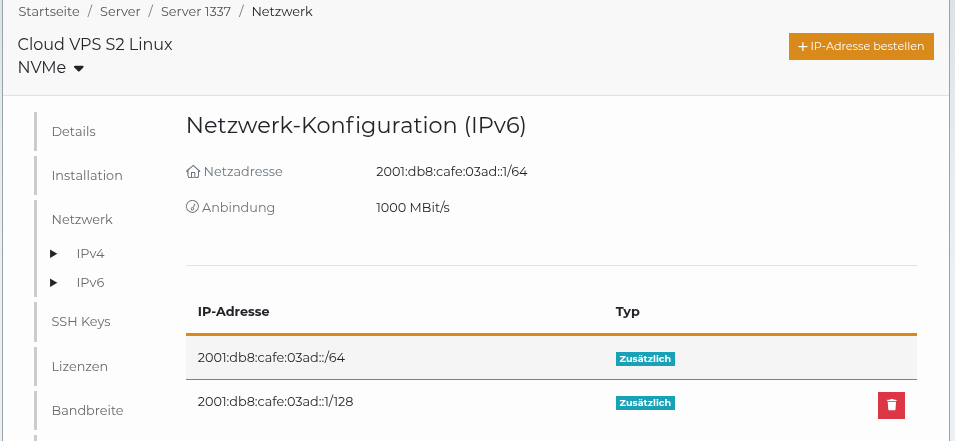
- Confirm you have an assigned IPv6 address (usually a /64 prefix) from Webtropia. In this example, the assigned prefix is
2001:db8:cafe:03ad::/64and we will use2001:db8:cafe:03ad::1/128as the static host address for the VPS. - The static address
2001:db8:cafe:03ad::1/128is configured in ZKM (Webtropia's control panel) and assigned to the VPS. This is required for the address to be reachable from the outside. - Webtropia often requires using a link-local gateway (fe80::...) as the IPv6 next-hop. You must scope the gateway to the interface (e.g.
fe80::1%eth0) and mark the routeon-linkso the kernel treats the gateway as directly reachable. - IPv6 connectivity can be set up with a static configuration (netplan in this example).
What to check before you start
On the VPS, inspect the current IPv6 routes and neighbour (router) entry:
ip -6 route
ip -6 neighbour
ip -6 addr show dev eth0
Example anonymized output:
$ ip -6 route
2001:db8:cafe:03ad::/64 dev eth0 proto kernel metric 256 pref medium
fe80::/64 dev eth0 proto kernel metric 256 pref medium
default via fe80::1 dev eth0 proto static metric 1024 onlink pref medium

$ ip -6 neighbour
fe80::1 dev eth0 lladdr aa:bb:cc:dd:ee:ff router REACHABLE
If you see a link-local route and a reachable router entry, your provider's gateway is visible and you can proceed with a static configuration.
Netplan example
Edit your netplan file (for example /etc/netplan/50-cloud-init.yaml) and add the IPv6 address and an on-link default route via the provider's link-local gateway. Use the interface scope when referencing the link-local gateway (%eth0).
Anonymized sample YAML:
network:
  version: 2
  ethernets:
    eth0:
      match:
        macaddress: "aa:bb:cc:dd:ee:ff"
      addresses:
        - 203.0.113.45/32 # example IPv4
        - 2001:db8:cafe:03ad::1/128 # example IPv6 host address (use /128 for a single address)
      nameservers:
        addresses:
          - 198.51.100.2 # example IPv4 DNS
          - 2001:db8::53 # example IPv6 DNS
      dhcp4: false
      dhcp6: false
      set-name: "eth0"
      routes:
        - on-link: true
          to: "0.0.0.0/0"
          via: "198.51.100.1" # example IPv4 gateway
        - on-link: true
          to: "::/0"
          via: "fe80::1%eth0" # provider link-local IPv6 gateway (scoped)
Important notes:
- Append the interface name after the link-local address (e.g.
fe80::1%eth0) so the kernel knows which interface to use. on-link: trueis required when your gateway is link-local and the kernel would otherwise not consider it directly reachable.
Apply configuration and verify
Apply netplan and check connectivity:
sudo netplan apply

ip -6 addr show dev eth0
ip -6 route
ip -6 neighbour

# test external IPv6 connectivity (example using Google's public DNS)
ping6 -c 3 2001:4860:4860::8888
If pings fail, recheck the ip -6 neighbour output and confirm the router is REACHABLE and that the configured IPv6 address belongs to the assigned prefix.
Troubleshooting
- "Network is unreachable" when pinging an IPv6 host:
- Ensure the IPv6 address is within the provider prefix (the /64 you were assigned).
- Verify the
default via fe80::...%eth0route exists and the neighbour entry shows the router asREACHABLE. - Remove or correct
match:if it prevents the interface from being namedeth0. You can removematch:or useset-name: "eth0"carefully. - Check that your firewall does not block ICMPv6. This is required for neighbour discovery and path MTU detection.
- No router seen in
ip -6 neighbour:- The link-local gateway must be visible at the link layer. Rebooting or briefly toggling the interface can prompt router discovery.
- DNS resolving only via IPv4:
- Make sure you list IPv6-capable nameservers in
nameservers.addressesor keep working IPv4 nameservers alongside IPv6 ones.
- Make sure you list IPv6-capable nameservers in
Logs: check journalctl -b or journalctl -u systemd-networkd (depending on your renderer) for netplan, cloud-init or networkd errors.
Firewall and security
- Apply equivalent IPv6 rules if you use iptables (ip6tables) or nftables. Don't assume IPv4 rules cover IPv6 traffic.
- Do not blanket-block ICMPv6. At minimum, allow neighbour solicitation/advertisement and echo request/reply. Without these, IPv6 routing and diagnostics will break.
- Only announce the single IPv6 address assigned to your instance unless you were explicitly given a routed prefix.
Conclusion
Once netplan is applied and ping6 reaches an external host, your Webtropia VPS is fully IPv6-capable. The key takeaway is the on-link: true route via a link-local gateway. Without it the kernel refuses to use the next-hop. If anything breaks later, the troubleshooting section above covers the most common pitfalls.
Feedback
Have thoughts or experiences you'd like to share? I'd love to hear from you! Whether you agree, disagree, or have a different perspective, your feedback is always welcome. Drop me an email and let's start a conversation.